Understanding how Tinder handles your location data is a primary privacy concern for most users. You likely want to know exactly when your matches see your current city and when your profile remains hidden in a previous location. We conducted rigorous technical tests to find out exactly how the Tinder algorithm processes location updates in real time.

Tinder does not automatically update your location in the background. Many online articles claim that Tinder tracks your movements continuously. Our technical team ran real world tests to verify this and our results confirm the exact opposite.
We tested across different locations with the Tinder app running in the background of our test devices. The app was open in the background but not actively visible on the screen. During this entire transit period our Tinder profile location never updated.
The application only updates your location when you meet three specific conditions:
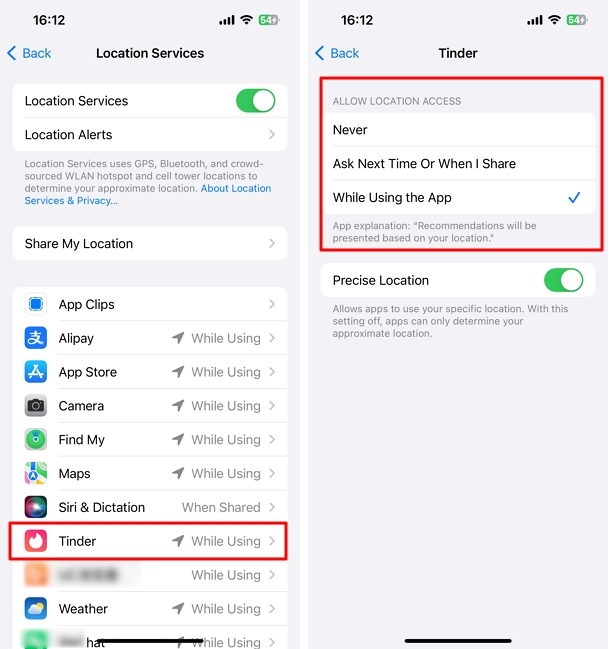
The iOS privacy settings only allow Tinder to request Location Services under the While Using the App permission level. Tinder does not even offer an Always Allow option in its iOS settings menu. The operating system physically blocks the application from pulling your GPS data when it runs in the background.
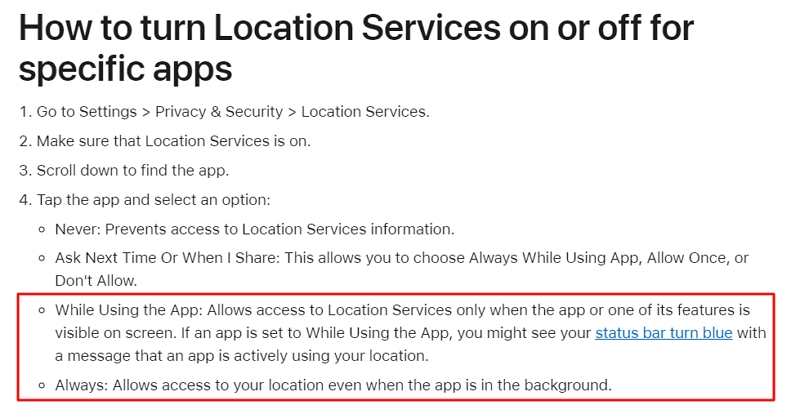
You must navigate to your device Settings then find Tinder and set Location to While Using the App. Tinder simply lacks the system permissions required to track you automatically when your phone is in your pocket.
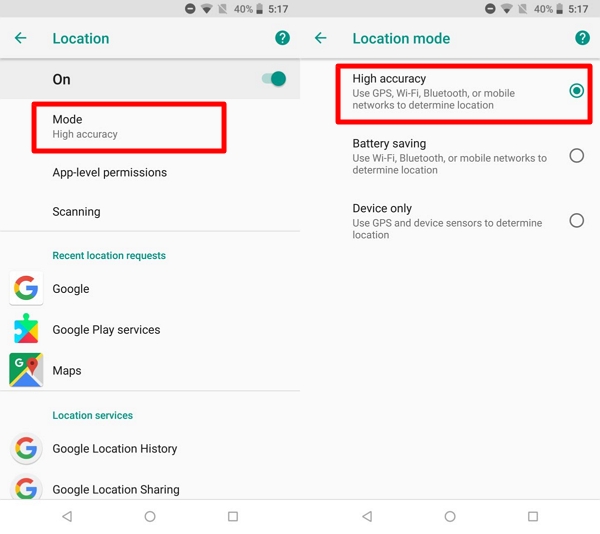
Your smartphone operating system ultimately dictates what data Tinder receives and when it can refresh. You must understand the critical difference between precise and approximate location settings.
Tinder requires Precise Location to process an update correctly. If you toggle this off to share only an approximate location the algorithm cannot accurately calculate your distance from potential matches resulting in a frozen swipe deck.
Android users face an additional hurdle with aggressive battery optimization protocols. If your Android phone enters battery saver mode the operating system actively blocks background applications and limits GPS polling to save power. This frequently prevents Tinder from acquiring a fresh location update even when you reopen the app.
Additionally if you use Tinder on a desktop web browser the platform relies entirely on your IP address and Wi-Fi network triangulation. This web based tracking is inherently less accurate than a mobile hardware GPS chip and often results in delayed location updates.
Because Tinder does not track you automatically you need to understand what other users actually see. The Tinder algorithm calculates the physical space between users using exact backend GPS coordinates.
However the user interface intentionally blurs this data to protect user privacy. Tinder only displays an approximate distance in miles rather than your pinpoint coordinates.
It is crucial to understand that the distance you see on a profile represents their last successful location update.
If a match opens Tinder in New York and then boards a flight to London their profile will still display the New York distance until they actively open the application in the UK. The platform freezes their geographic footprint the exact moment they close the app.

Users frequently encounter frozen locations after traveling or moving to a new city. If you open the app and your location fails to update automatically follow these specific steps to force a refresh and fix a stale profile immediately.
Step 1 Check Device Permissions
Navigate to your phone settings and ensure Tinder has location access set to While Using the App. Verify that the Precise Location toggle is turned on.
Step 2 Disable Battery Saver Mode
Turn off low power mode on iOS or battery optimization on Android. This allows your GPS chip to poll at full strength without system restrictions.
Step 3 Disconnect VPN Services
A Virtual Private Network masks your IP address and conflicts with your hardware GPS. Disconnect any active VPN to allow Tinder to read your actual device coordinates cleanly.
Step 4 Force Restart the Application
Swipe up on your device app switcher to kill Tinder completely. Relaunching the app forces the system to ping the servers with fresh GPS data.
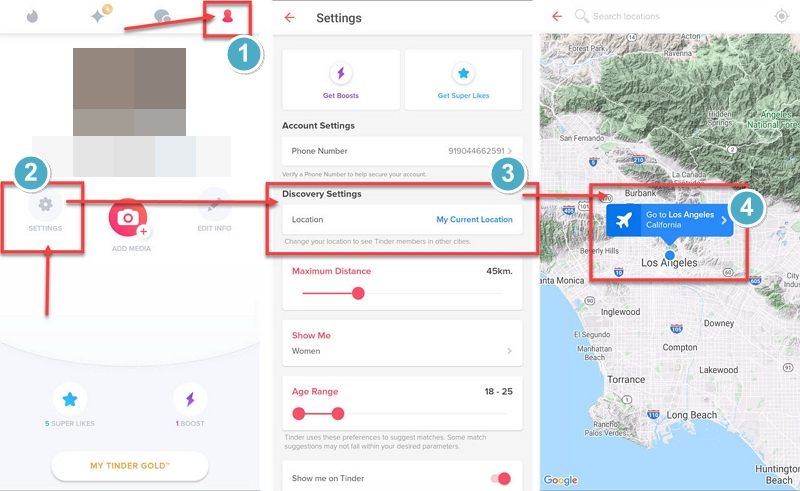
Tinder provides native tools to manage your geographic footprint manually. Tinder Passport is a premium feature that overrides your physical GPS allowing you to drop a pin in any city globally.
When Passport is active the application ignores your actual physical location updates completely. Premium subscribers can also utilize incognito features to hide their distance from other users adding a vital layer of privacy.
If you want to explore international matches without paying for Tinder Passport you can use a professional desktop location spoofer. MockGo remains the safest solution for iOS users to simulate location changes securely.
However you must avoid cheap mobile spoofing apps. The Tinder algorithm actively detects erratic GPS jumping and will permanently shadowban accounts using unstable simulation tools.
Does Tinder update your location when the app is closed?
No. Tinder cannot access your GPS data when the application is completely closed or suspended in the background. It only updates when the interface is active on your screen.
How often does Tinder refresh your location?
Tinder refreshes your location the exact moment you open the application. It will continue to ping the server periodically while you are actively swiping but stops immediately when you leave the app.
Why does Tinder show the wrong city or distance after moving?
The application caches your last known location. If you travel and experience a stale location your phone battery saver might be blocking GPS updates or you may have lost precise location permissions.
Does Tinder Passport override your real location?
Yes. When you activate Tinder Passport the platform completely ignores your physical device GPS. You will only appear in your chosen destination until you turn the feature off.
Can you hide your distance or stop sharing your location on Tinder?
Tinder Premium subscribers can toggle a setting to hide their distance from other users. However you cannot stop sharing your location entirely. You must provide location access to the app itself to load the swipe deck.
Does using a VPN or GPS spoofing app change your Tinder location?
A VPN will not change your Tinder location because the app relies on hardware GPS not your IP address. A professional GPS spoofing tool like MockGo will successfully change your location but you must use it responsibly to avoid algorithmic bans.
Does Fake GPS Still Work with Tinder?
The simple answer to "Does fake GPS still work with Tinder" is "Yes." If you would like to meet people outside the scope of your location, you can use GPS spoofing apps such as MockGo to fake the location for iPhone without jailbreak and match with people outside the 100-mile radius limit that Tinder works with.
Tinder will never update your location automatically in the background without your active engagement. You remain in total control of when your location refreshs on the platform. If you want your profile to stay anchored to your previous location simply leave the application closed while traveling.
When you are ready to update your whereabouts and explore local matches in a new city open the app to trigger an active GPS ping. Managing your app usage ensures your geographic footprint updates strictly on your own terms.


Mako is a technical writer with a passion for all things tech. Whether you're wondering about how to fix your iPhone or Android device or trying to get something to work in your settings, Mako is your go-to for professional help. He loves writing, testing solutions, and most of all, making sure his research is factually accurate.



 MockGo - iPhone GPS Changer
 Unlockit iPhone - Screen Unlocker
 Unlockit iCloud - Activation Lock Remover
 Unlockit Android - Screen Unlocker
 TinyFix - iOS System Repair