Connecting with Black singles in your area is the primary focus of the BLK dating app. Life changes quickly and you might need to expand your dating pool before relocating to a new state traveling for work or simply protecting your neighborhood privacy.
Learning how to change location on BLK requires specific technical steps because dating apps rely heavily on your exact physical coordinates. This guide explains how the platform tracks your device and provides the exact methods to change your BLK location safely.
You must understand how location tracking works before attempting to modify your account. BLK uses two completely different data points to determine where you are and who you see.
The first data point is your profile city. This is the static text displayed publicly on your profile card. The second data point is your live device GPS location. This device data drives the actual matching algorithm.
Many users mistakenly believe that editing their profile city will automatically show them singles in that new area. Updating your display city only changes the text other users read. It does not refresh your matchmaking feed with users from a different geographical region.
Many users waste money on VPN services expecting them to unlock new dating markets. A VPN only encrypts your network traffic and changes your IP address. BLK relies strictly on your device's GPS module to populate the local feed. A VPN will never change your BLK matchmaking grid.
| Method | What It Changes | Impact on Match Feed |
|---|---|---|
| Profile Edit | Public display text only | Zero effect on who you see |
| VPN Service | Network IP address | Zero effect on who you see |
| GPS Spoofing | Device location coordinates | Completely changes your match feed |
The mechanics of GPS tracking are similar across the dating apps. Whether you want to know how to change location on Skout explore how to change location on Hily or figure out how to change location on Chispa the fundamental rules remain identical.
You should always verify your native application settings before downloading external spoofing tools. You can update your public display location directly inside your profile settings inside the BLK app to ensure your text matches your intended physical location.
Step 1. Open the BLK application and navigate to your main profile settings.
Step 2. Tap the Edit Profile button and scroll down to the location data field.
Step 3. Enter your new desired city and save the changes.
Step 4. Force close the application completely and reopen it to refresh your profile card.
This process updates your public visibility. If the app still restricts your potential matches to your actual physical location you will need to modify your operating system GPS coordinates manually.
Apple restricts location spoofing heavily to maintain operating system integrity. There are no developer options on an iPhone that allow you to fake your GPS with a simple app download from the App Store. The most reliable method requires professional desktop software to overwrite the GPS coordinates broadcasted by your iOS device safely.
MockGo iOS location changer is the industry standard for this exact process. It overrides the iOS location services safely without requiring any complicated jailbreaking procedures. It supports all modern iPhones including iPhone 18 and provides flawless compatibility up to the latest iOS 26.
MockGo provides several advanced capabilities beyond simple teleportation.
Follow these exact steps to update your iOS coordinates.
Step 1. Get the MockGo desktop installed on your computer.
Step 2. Plug your iPhone into the computer and tap the trust device prompt on your screen.
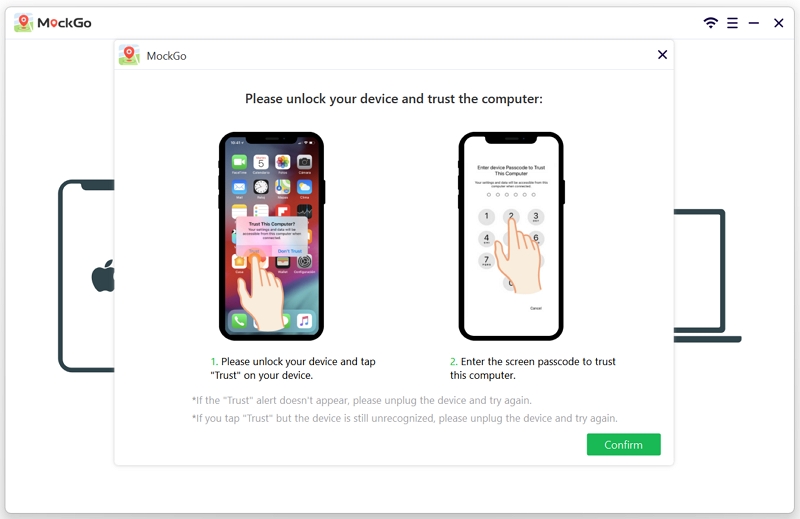
Step 3. Locate the search bar in the upper section of the application interface. Type your target city or specific neighborhood and hit the search icon.

Step 4. Click the Move Here button to instantly change your device coordinates.

Step 5. Close the BLK application completely on your phone and open it again to see your new local matches.

Modern Android devices handle location spoofing through native developer tools paired with third party applications. You can configure your device securely without rooting your phone provided you run Android 6.0 or newer.
Fake GPS Location Spoofer is an excellent choice because it operates without root access and offers a straightforward interface for pinpointing exact cities.
Follow the following steps to change GPS location on your Android device.
Step 1. Go to Android settings and tap the build number repeatedly to activate developer mode.
Step 2. Download Fake GPS Location Spoofer from the official application store.
Step 3. Open the newly installed app and grant all necessary tracking permissions.
Step 4. Return to your main settings and enter the developer menu.
Step 5. Find the mock location app setting.
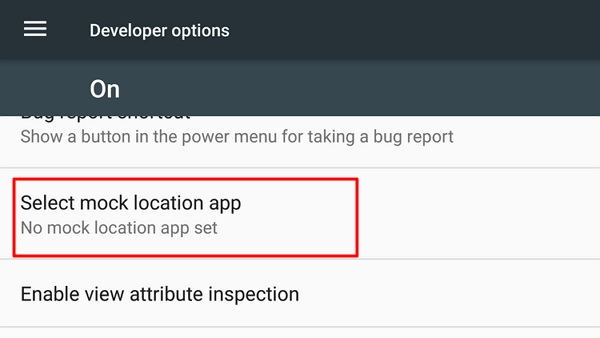
Step 6. Choose the downloaded spoofing tool from list.
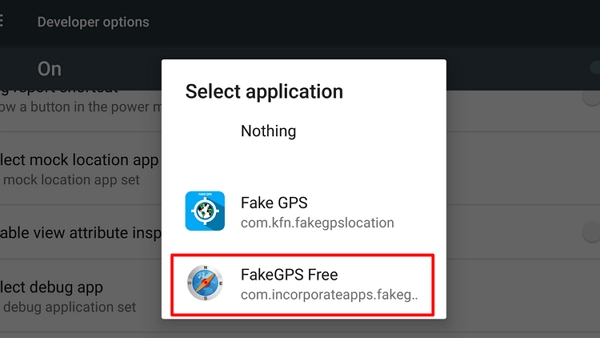
Step 7. Turn On the Airplane mode and your wireless network to prevent GPS jumping.
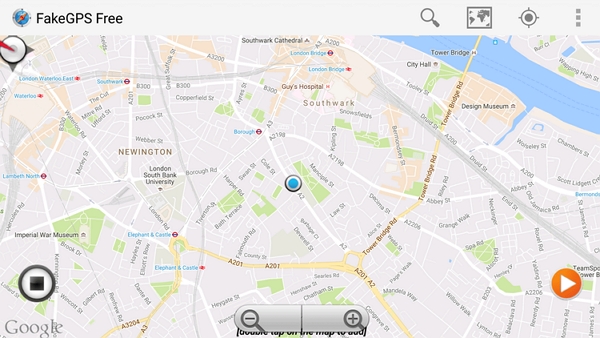
Step 8. Open the spoofing application and drop a pin on your preferred city.
Step 9. Tap the activation button to finalize your new coordinates before browsing BLK.
Turning on Airplane mode in Step 6 is critical for Android users. Leaving this feature active causes your phone to jump frantically between your real location and your fake location. Dating algorithms easily detect this rubber banding effect and may shadowban your account.
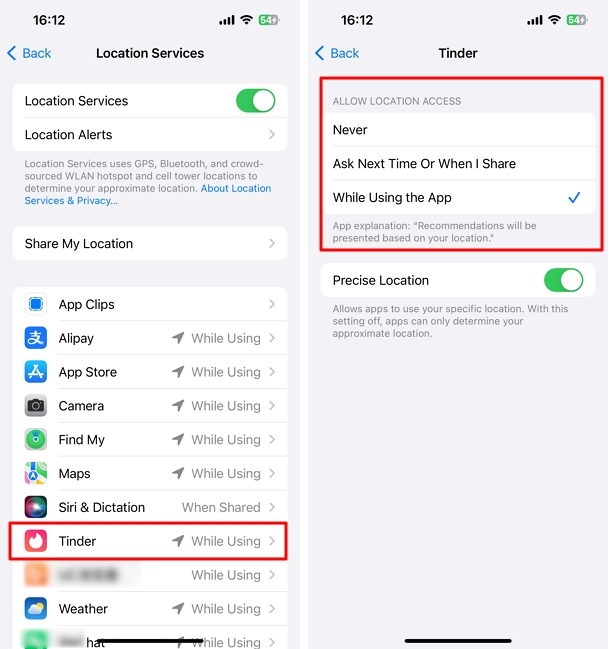
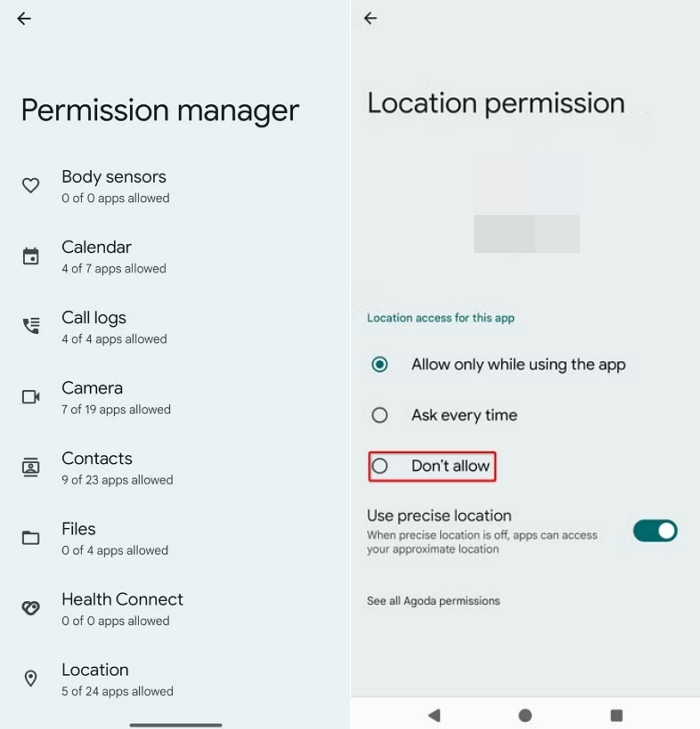
If your phone gets stuck and refuses to update your location even after you travel or use spoofing tools. This usually happens because basic device permissions are blocking the data transfer. You need to build a flawless bridge between your operating system and the BLK app.
Follow these steps for iPhone:
Follow these steps for Android:
Always restart your smartphone completely after modifying these core system permissions.
You might not need to change your GPS coordinates at all. If you simply want to see more people expanding your discovery radius is the safest and easiest native solution. This strategy works exceptionally well if you live in the suburbs or outside major metropolitan hubs like Atlanta Chicago or Houston.
Expanding your distance will not place you in a completely different state but it prevents you from running out of profiles in your immediate local area.
Understanding how to change location on BLK gives you total control over your digital dating life. Prioritize native app distance settings and profile text updates if you only want a minor adjustment.
If you want to interact with local grids in completely different cities choose the right technical tool for your specific device. Android users should leverage native mock location settings while iPhone users must rely on premium desktop software to bypass Apple security restrictions safely.
Can I manually change my location on BLK?
You can update your display city text in your profile settings. Changing your actual matchmaking feed requires you to physically travel or use dedicated GPS spoofing tools to modify your device coordinates.
Why is BLK still showing my old location after I moved?
Your app cache is holding outdated location data or your device permissions are disabled. Force close the app completely clear the application cache in your phone settings and ensure location permissions are set to While Using the App.
Does using a VPN change my location on BLK?
No. A VPN only routes your internet traffic through a different IP address. BLK relies strictly on your device's GPS chip to determine your physical location and populate your match feed.
How do I reset BLK back to my real current location?
Stop your spoofing software or disable the mock location app in Android Developer Options. Restart your smartphone to flush the fake coordinates from system memory and open the BLK app to sync your real location.
Does BLK have a travel mode or premium location feature?
Unlike some premium dating apps BLK generally relies on your live physical location. You must use operating system level spoofing tools if you want to explore matches in a distant city before arriving.
Is it safe to use mock GPS apps to change my BLK location?
It is generally safe if you use reputable software. You must disable WiFi scanning in your Android settings to prevent aggressive location jumping which can trigger automated security flags on your dating profile.




 MockGo - iPhone GPS Changer
 Unlockit iPhone - Screen Unlocker
 Unlockit iCloud - Activation Lock Remover
 Unlockit Android - Screen Unlocker
 TinyFix - iOS System Repair