Connecting with people in your current area is the core feature of Skout. Sometimes you need to expand your search grid before relocating to a new state or planning a vacation.
Modifying your location on social platforms requires more than a simple profile edit. This guide breaks down how location tracking works on Skout and provides the exact technical steps to change your Skout location safely.
Skout automatically determines your location by using your device GPS and location services when enabled. As a location based social discovery app Skout involves two distinct location elements that users frequently confuse.
The first element is your profile city. This is the text displayed publicly on your profile page. The second element is your live device GPS location which drives the Nearby match feed.
Many guides mistakenly confuse changing your profile city with modifying your actual GPS position. Updating your profile display city only changes the text other users see when viewing your profile. It will never refresh your Nearby feed with users from that new geographical area.
Users across the United States often look to alter their location when moving to a new city planning short term travel connecting with locals prior to arrival or protecting their personal home privacy.
Keep in mind that the exact Skout interface and menu labels may vary depending on whether you use iOS or Android your region and your specific app version.
Always check the native application settings before downloading external tools. Skout allows you to update your public display location directly inside your profile settings.
Step 1 Open the Skout application and navigate to your main profile settings.
Step 2 Tap on your current city or location data field.
Step 3 Enter your new desired city and save the changes.
Step 4 Force close the application completely and reopen it to trigger a server refresh.
This process updates your public profile visibility. If the app still restricts your Nearby match feed to your physical location you will need to modify your operating system GPS coordinates manually.
Many users waste money on VPN services expecting them to change dating app locations. A VPN only encrypts your network traffic and changes your IP address. Skout strictly relies on your hardware GPS module to populate the local feed. A VPN will not change your Skout location. You need dedicated GPS modification tools.
Desktop spoofing software offers the highest success rate for iPhone users with very low account risk. Android users can achieve high success rates using mock location apps with medium setup difficulty.
| Method | Device | Location Type | Success Rate | Setup Difficulty | Account Risk |
|---|---|---|---|---|---|
| Desktop Spoofing Software | iPhone | GPS location | Very High | Low | Low |
| Mock Location Apps | Android | GPS location | High | Medium | Medium |
| VPN | Both | IP address | Zero | Low | None |
Apple restricts location spoofing heavily to maintain system integrity. There are no developer options on an iPhone that allow you to fake your GPS with a simple app download from the App Store. The most reliable method requires professional desktop software to overwrite the GPS coordinates broadcasted by your iOS device.
MockGo is the industry standard for this process. It overrides the iOS location services safely and changes the GPS without requiring any complicated jailbreaking procedures. It supports all modern hardware and software environments providing flawless compatibility up to the latest iOS 26 architecture.
Step 1. Download and install MockGo on your Mac or Windows computer.
Step 2. Launch the software and connect your iPhone using an original USB cable.
Step 3. Unlock your phone screen and tap Trust This Computer when the system prompt appears.
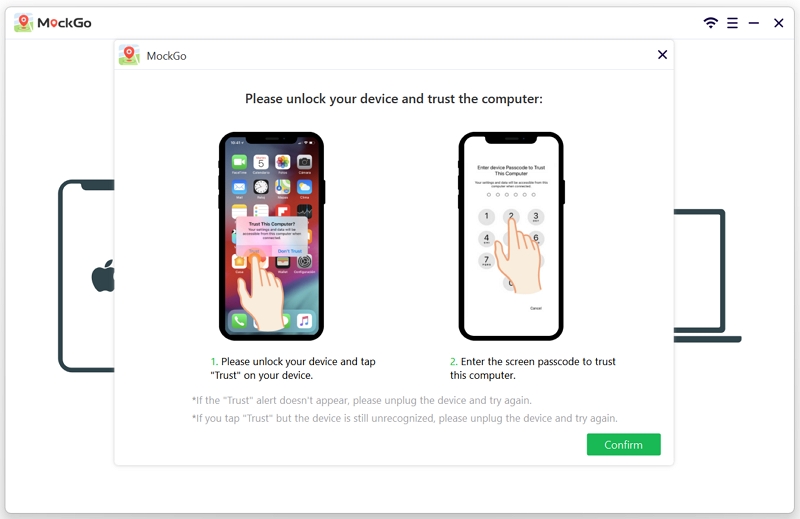
Step 4. Open the Teleport Mode located in the top right corner of the MockGo interface.

Step 5. Enter your desired city into the search bar and hit Go.

Step 6. Click the Move Here button on the map to modify the GPS coordinates of your iPhone.

Step 7. Swipe up on your iPhone screen to access the app switcher and force close Skout completely.

Step 8. Reopen Skout to force the app to request fresh location data from your altered operating system.
Modern Android devices handle location spoofing through native developer tools paired with third party applications. You can configure your device securely without rooting your phone provided you run Android 6.0 or newer.
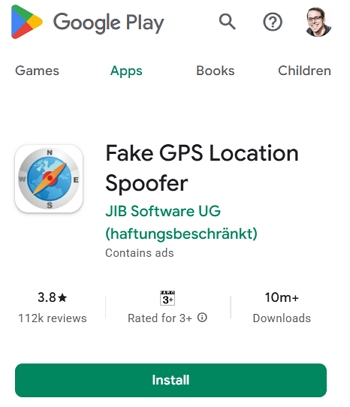
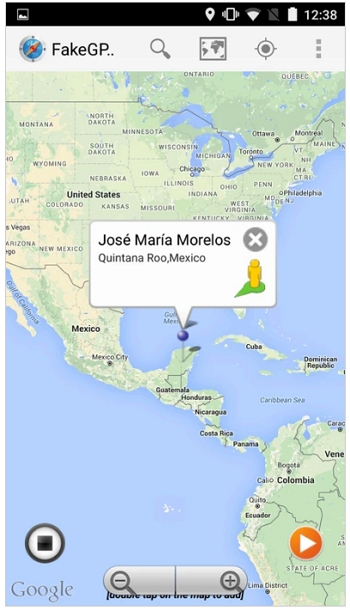
Fake GPS Location Spoofer is an excellent choice for this process because it operates without root access on modern Android versions. It offers a straightforward interface that lets you search specific cities set custom map pins and create automated routes easily.
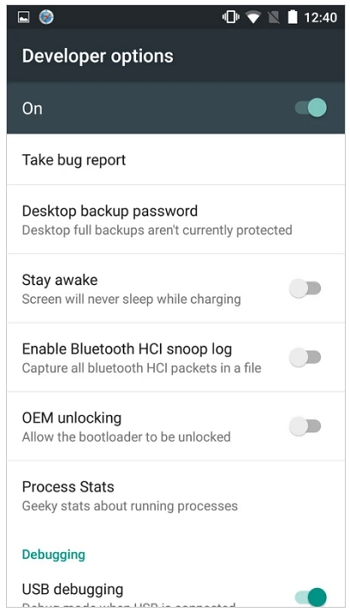
Step 1. Navigate to your phone Settings and tap About Phone.
Step 2. Find the Build Number and tap it seven times continuously to unlock Developer Options.
Step 3. Open the Google Play Store and install the Fake GPS Location Spoofer application.
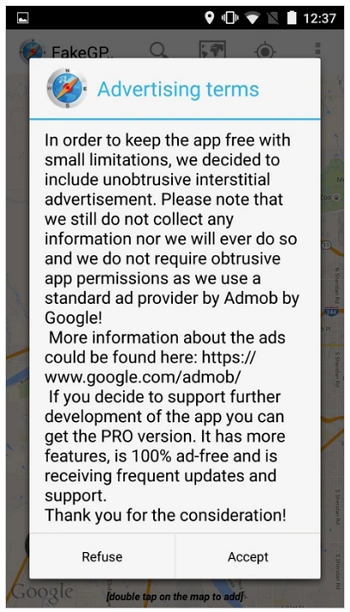
Step 4. Launch the app and tap Allow to grant notification and location access permissions.
Step 5. Tap Accept on the terms prompt and choose Enable from the mock locations message at the bottom.
Step 6. Choose Developer Settings to open the menu and tap Select mock location app.
Step 7. Select FakeGPS Free from the list and use the back button to return to the spoofing app.
Step 8. Search for your desired city on the map or drag the map to position the pointer.
Step 9. Tap the play button at the bottom of the screen to lock the new coordinates and launch Skout.
Sometimes your phone gets stuck between your real location and your fake coordinates. Follow this strict troubleshooting sequence to force a hard location reset on your device.
Modifying your location gives you total control over your digital social life. Prioritize native app settings if you only need to update your public profile text. If you want to interact with local grids in foreign cities choose the right technical tool for your device.
Android users should leverage native mock location settings while iPhone users must rely on premium desktop software to bypass Apple security restrictions safely.
How do I change my current city on Skout?
You can update your display city by navigating to your profile settings inside the app and editing the location field directly. This updates your public profile but will not change your live Nearby feed.
Can I manually set my Skout location without changing my phone GPS?
You can only change your profile display text inside the app. The core Nearby matchmaking feed requires actual GPS modification to populate with users from a different region.
Why is Skout still showing my old location after I moved or traveled?
Your app cache is holding outdated location data. Force close the app completely clear the application cache in your phone settings and ensure location permissions are actively granted.
Does a VPN change my GPS location on Skout?
No. A VPN only routes your internet traffic through a different IP address. Skout relies strictly on your device hardware GPS chip to determine your physical location.
Can I change my Skout location on iPhone without jailbreaking or using desktop software?
No. Apple security prevents mobile applications from altering system wide GPS data. You must use desktop software to override these coordinates securely without a jailbreak.
How do I reset Skout back to my real location?
Stop your spoofing software or disable the mock location app in Android Developer Options. Restart your smartphone to flush the fake coordinates from system memory and open Skout.


Mako is a technical writer with a passion for all things tech. Whether you're wondering about how to fix your iPhone or Android device or trying to get something to work in your settings, Mako is your go-to for professional help. He loves writing, testing solutions, and most of all, making sure his research is factually accurate.



 MockGo - iPhone GPS Changer
 Unlockit iPhone - Screen Unlocker
 Unlockit iCloud - Activation Lock Remover
 Unlockit Android - Screen Unlocker
 TinyFix - iOS System Repair