Changing your location on dating platforms such as Hily requires more than just updating a text field in your profile settings. Dating algorithms are strictly tied to your device hardware to serve local matches and prevent bot activity.
If you want to explore dating pools in other cities or fix a profile stuck in a previous location, you need to understand exactly how the app reads your geographic data and how to bypass those technical restrictions safely.
Here is the definitive guide to managing and changing your GPS location on Hily effectively.
Hily does not determine your location based on your IP address or manual profile inputs. The application pulls your exact coordinates directly from the operating system location services on your device. It relies on the physical GPS chip, Wi-Fi triangulation, and cellular tower data to pinpoint where you are standing.
Many users find their location gets stuck after traveling or moving to a new city. This freezing happens when your operating system battery optimization restricts background location polling or when the app caches your old location data locally.
Many users mistakenly purchase a VPN hoping to change their dating location. A VPN successfully masks your IP address and secures your network traffic but it does absolutely nothing to alter your device GPS coordinates.
When Hily cross references your masked IP address in London against your hardware GPS reporting from New York it strictly defaults to the hardware data. To change your location successfully you must override the GPS coordinates at the operating system level.

Before modifying your device settings you should evaluate the official tools provided within the application. Hily offers a premium Global Search feature designed for users who simply want to browse profiles outside their immediate radius without risking their account standing.
However accessing advanced discovery tools like Global Search requires a paid subscription known as Hily Premium or Premium Plus. This official upgrade provides the safest way to browse international profiles without relying on third party location spoofing tools.
The pricing structure for Hily Premium typically starts around $14.99 for a weekly subscription, and $119.99 for a yearly subscription. They also offer a Premium Plus tier at approximately $24.99 per week which unlocks additional features like seeing who liked your profile and sending priority messages.
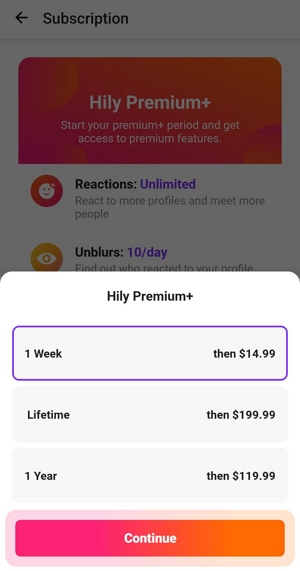
You can access this premium feature quickly within your application settings after the payment to view international users.
Step 1. Open Search Filters
Launch Hily and navigate to the main swiping screen. Tap the filter icon to open your matchmaking preferences.
Step 2. Locate Global Search Option
Look for the Global Search option or expand your distance radius to the maximum allowed limit.
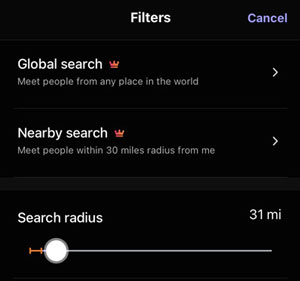
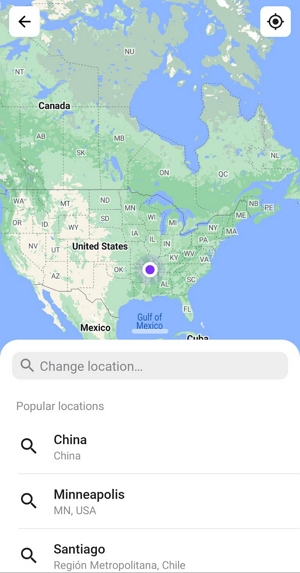
Step 3. Select Your Target Region
Enter your desired city or country into the search field. The application will refresh and begin showing you profiles from that specific area.
You must understand the technical difference between using Global Search and actually changing your GPS location. Global Search allows you to look outward but it does not place your profile physically in the target city for local users to discover organically.
If your goal is to integrate completely into a new local dating pool and let local users swipe on you natively you must change your device GPS.
Apple heavily restricts location spoofing to maintain system integrity. There are no developer options on an iPhone that allow you to fake your GPS with a simple app download. The most reliable and secure method is using professional desktop software to overwrite the GPS coordinates broadcasted by your iPhone.
MockGo is the industry standard for this process. It overrides the iOS location services safely without requiring any complicated jailbreaking procedures. It supports all modern hardware and software environments providing flawless compatibility from iOS 18 directly to iOS 26.
Step 1. Install the Desktop Software
Download and install MockGo on your Mac or Windows computer.
Step 2. Connect and Authorize Your iPhone
Launch the software and connect your iPhone using an original USB cable. Unlock your phone screen and tap Trust This Computer when the system prompt appears.

Step 3. Select Your Target Location
Open the Teleport Mode in the top right corner of the MockGo interface.

Enter your desired city or specific address into the search bar and hit enter.

Step 4. Change Your GPS
Click the Move Here button on the map. Your iPhone GPS is now globally modified to the new coordinates.

Step 5. Force a Location Refresh
Swipe up on your iPhone screen to access the app switcher and force close Hily completely. Reopen the application to force it to request fresh location data from your operating system. Your profile is now active in the new city.
Android users have a more direct path due to the open nature of the operating system. However you cannot change your location using developer tools alone. You must pair the built in developer settings with a dedicated third party application like Fake GPS Location to change the Android location successfully.
Step 1. Enable Developer Options
Navigate to your phone Settings and tap About Phone. Find the Build Number and tap it exactly seven times to unlock Developer Options.
Step 2. Download a Fake Location App
Open the Google Play Store and download a reputable location spoofing application. Fake GPS Location by Lexa is a highly reliable and free option that works perfectly for this process.
Once installed go back to your main Settings menu and open Developer Options. Scroll down to Select mock location app and choose the application you just downloaded.
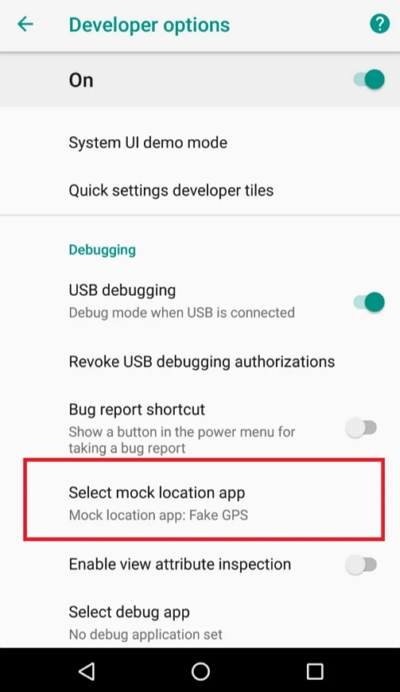
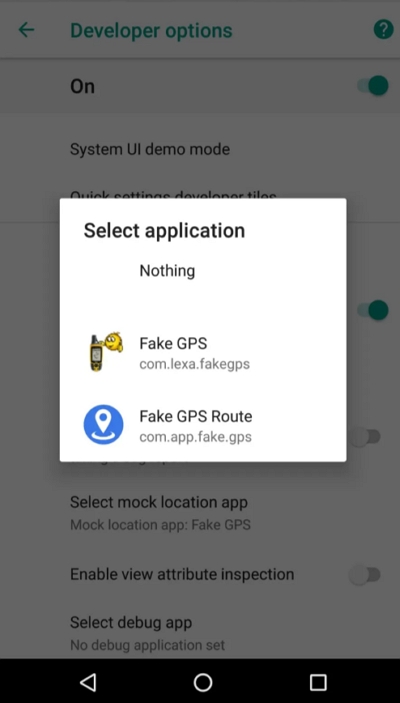
Step 3. Disable Wi-Fi Scanning
Go to your Location settings and turn off Wi-Fi and Bluetooth scanning. Leaving this on causes your phone to jump frantically between your real location and your fake location creating a rubber banding effect that dating algorithms easily detect.
Step 4. Set the New Coordinates
Open your downloaded Fake GPS application.
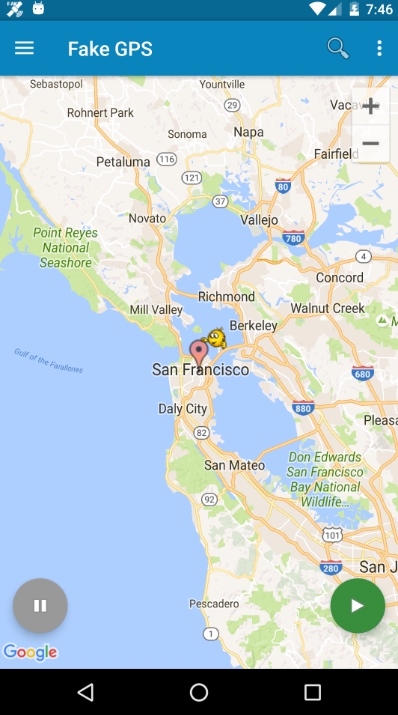
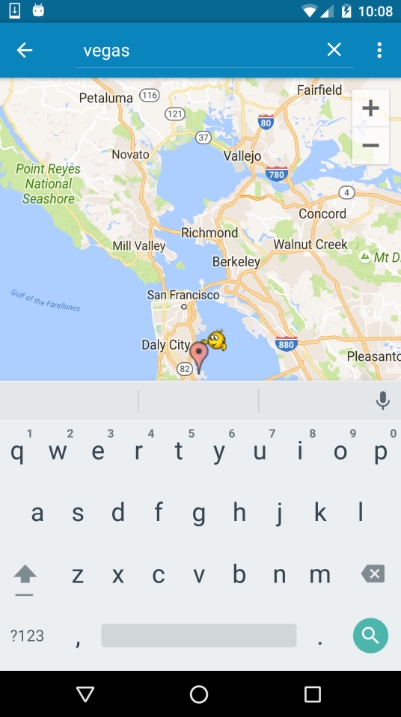
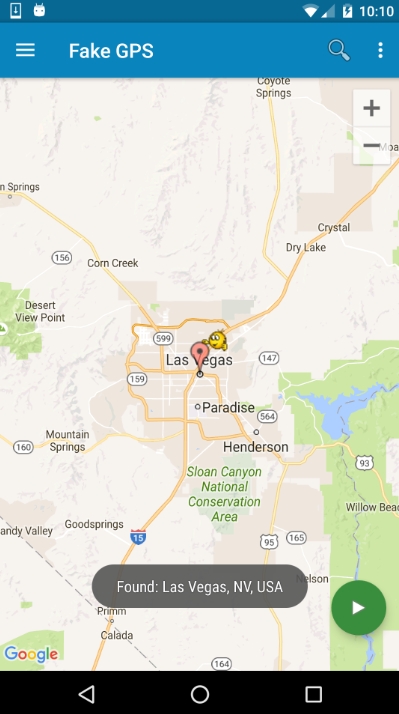
Navigate the map to your desired city and press the play button to start spoofing.
Step 5. Clear App Cache
This is the step most users miss resulting in a stuck profile. Go to Settings then Apps and select Hily. Tap Storage and clear the application cache. Force stop the app and launch it again to verify your new location.
Changing your location carries inherent account risks if done recklessly. Dating platforms inlcuding Hily utilize sophisticated anti cheat algorithms to detect bot behavior.
If your GPS registers in New York at noon and suddenly appears in Tokyo at five minutes past noon the algorithm immediately flags your account. This triggers a shadowban where you can still swipe on profiles but your profile is completely hidden from other users resulting in zero matches.
Always observe realistic travel times. If you intend to switch cities close the application completely and wait the actual amount of time it would take to fly to that destination before reopening Hily at the new coordinates.
When evaluating software recognize the difference between free and paid tools. Free Android applications often suffer from connection drops and aggressive advertising. Desktop tools hold the GPS coordinates completely stable preventing the sudden location jumps that trigger algorithmic bans.
Does Hily have a built in setting to change my location?
No. Hily strictly uses your device GPS to determine your location. It does offer a Global Search feature to view users in other areas but this does not physically place your profile in that new city for others to see you.
How do I fake my GPS location on Android for Hily without rooting?
You can unlock Developer Options in your Android settings and use the Select mock location app feature. Pair this with a reliable GPS spoofing application from the Play Store to change your coordinates globally without rooting your device.
Can I change my Hily location on iPhone without jailbreaking?
Yes. You can bypass Apple restrictions by using dedicated desktop software like MockGo. You connect your phone to your computer and the software safely overwrites your GPS signal without requiring a jailbreak.
Why does Hily still show my old or wrong location after I move?
This usually happens because the app has cached your previous coordinates or your phone battery saver is restricting background GPS updates. Clear the application cache and ensure Hily has precise location permissions enabled in your device settings.
Align your method with your actual dating goals. If you are traveling soon and want to scope out the area beforehand rely on the official Hily Global Search to protect your account standing.
If you are permanently stuck in a location or want full organic integration into a new city utilize robust tools like MockGo for iOS or configured Android developer options.
Treat your digital location carefully and always remember to restart your phone after you finish swiping to restore your authentic GPS coordinates for vital applications like weather maps and ride sharing services.




 MockGo - iPhone GPS Changer
 Unlockit iPhone - Screen Unlocker
 Unlockit iCloud - Activation Lock Remover
 Unlockit Android - Screen Unlocker
 TinyFix - iOS System Repair