You may want to spoof your iPhone's GPS to gain an advantage in a location-based AR game like Pokémon Go or to access an app or content that may not be available in your current location.
Whatever the reason, you will need an app or program to help you easily change the GPS location on your device. One of the most popular options is iMyFone AnyTo.
But if you don't want to settle for the first solution you see, or if AnyTo fails to work sometimes, consider the following five best alternatives to iMyFone AnyTo.
Best AnyTo Alternative: MockGo
One of the best alternatives to AnyTo for teleporting your iPhone's GPS to any location or simulating GPS movement is MockGo.
This is a reliable iOS GPS changer designed by a professional team that understands the needs of people who want to easily fake their iPhone's GPS location.
This iOS location spoofing service offers a feature-rich, all-inclusive utility. Some of its key features and where you can use the app are listed below:
MockGo Features:
- Teleport the GPS: Change your device's GPS with just one click.
- Fake GPS Walking: Simulate GPS movement between two or multiple spots as you desire.
- Multiple Device Spoofing: Manage the GPS locations of up to five different iOS devices simultaneously.
- Cooldown Timer: Play location-based games such as Pokémon GO with a cooldown timer.
- Joystick Movement: Replicate actual physical movements using the virtual joystick.
- App Compatibility: Compatible with gaming apps such as Pokémon GO, social media platforms like Facebook and Instagram, and dating apps like Tinder and Bumble, among others.
- Device Compatibility: Compatible with all iOS devices and all versions of iOS, including the latest iPhone 15 and iOS 17.
Comparison of MockGo's pricing to AnyTo
MockGo's pricing plans:
- 1-month $9.95
- 3-month $19.95
- 1-year $39.95
- lifetime $59.95
AnyTo's VIP pricing plans:
- 1-month $14.99
- 3-month $29.99
- 1-year $59.99
- lifetime $89.99
MockGo's pricing plan is slightly cheaper than AnyTo's. The lifetime plan offered by AnyTo is more expensive than MockGo's lifetime plan.
Comparison of MockGo's features to AnyTo
| |
AnyTo |
MockGo |
| Rate |
⭐⭐⭐⭐ |
⭐⭐⭐⭐⭐ |
| Teleport mode |
√ |
√ |
| Simulate GPS movement |
√ |
√ |
| Joystick |
√ |
√ |
| Customize speed while moving |
× |
√ |
| Import GPX |
√ |
√ |
| Multi-device control |
5 devices |
5 devices |
| Historical records |
√ |
√ |
| Favorite list |
√ |
√ |
| Platform |
Win 10/8.1/8/7/Vista/XP
Mac OS X 10.9 or later
iOS
Android |
Win 10/8.1/8/7/Vista/XP
Mac OS 10.9 or later |
| Device |
Support iOS and Android devices |
Support iOS devices only |
| License availability |
The license for Windows can't be used on macOS and vice versa |
The license can be used either on Windows or Mac computer |
How to Use MockGo
Teleport GPS Location
To use MockGo to change the GPS location, download and install the program, and then follow these simple steps:
Step 1: Open MockGo on your computer after installation and then connect the iPhone to the computer. Click "Start" to begin.

Step 2: You will see a map on the screen. Select the "Teleport Mode" from the three options at the top-right side of the screen.

Step 3: Type in the location in the search box, then click "Move Here" to teleport the device to this new location.

The GPS location on your device will change to the new simulated location.

Simulate Movement
To simulate GPS movement between two spots, follow these simple steps:
Step 1: Once the device is connected to the computer, select the "One-Stop mode".

Step 2: Select the spot on the map where you would like to move, and a popup will appear indicating the distance between the two spots.

Step 3: Select the speed that you want to use and then click "Move Here" in the pop-up that appears.

Step 4: Another popup will appear asking you to enter the number of times you would like to move between the two spots. Enter a numerical value and click "Start" to begin the simulated GPS movement.

Pros
- A wide range of features available, including GPS teleportation, movement simulation, and more.
- Support for importing GPX files, allowing users to customize routes and locations.
- Ability to change speed while moving, providing greater control and realism.
- Flexible license availability, offering various pricing plans to suit different needs and budgets.
Cons
- Limited trial features may restrict users from fully experiencing the capabilities of the software before purchasing.
- No Android or iOS app available.
2. Dr. Fone - Virtual Location
Dr. Fone - Virtual Location is another alternative to AnyTo that can effectively spoof the location on your iOS device.
One of its main benefits is its clean and easy-to-use interface, allowing users to change the GPS location to anywhere in the world with a single click.

Features:
- Change the GPS location for iOS and Android to anywhere in the world with one click.
- A desktop solution that requires connecting the iPhone to the computer; no jailbreak is needed.
- Simple location selection by entering the new location.
- Ability to simulate movement along a specified route at a specific speed.
Price
- 1-Month Plan:$9.95
- 3-Months Plan: $19.95
- 1 Year Plan: $39.95
- No lifetime plan
Pros
- Lower risk of being banned.
- Simple interface design.
Cons
- Works only on PC/Mac; no mobile apps available.
- The price is slightly higher compared to similar apps.
3. iTools Virtual Location
ThinkSky iTools is another useful tool for managing iOS devices, including changing the GPS location by using its virtual location feature. It doesn't require jailbreaking the device to simulate GPS location, but it lacks an iOS app, meaning it must be installed on your computer.
Changing the location with iTools is straightforward: simply use the pin to select the desired location. The free version of iTools allows three location simulations before requiring the purchase of the premium tool.

Features
- Easily spoof the GPS location of an iPhone or iPad running iOS 12 and later.
- Backup almost all iPhone/iPad data and restore it easily.
- Provides iOS to PC Screen Mirroring for mirroring the iPhone/iPad screen onto a desktop computer (Windows or Mac)
Price
- Premium License for 1 computer: $30.95
- Premium License for 5 computers: $34.95
- Platinum License for 15 computers: $69.95
- Platinum License for 30 computers: $129.95
Pros
- All-in-one iPhone manager tool; can also be used for quick and easy backup and restoration of iPhone/iPad devices.
- Easily fake the iPhone/iPad GPS location.
Cons
- Some reports indicate incompatibility with antivirus software.
- Certain features, such as WiFi sync, require iTunes to be installed on your PC.
- Not compatible with Android devices.
- The pricing is relatively high.
4. Tenorshare iAnyGo
Tenorshare iAnyGo is a location-changing app for iOS devices that allows you to fake your iPhone's GPS position. When changing the location on iOS devices, specific software must be used with a computer as a conduit.
iAnyGo is compatible with the latest iOS 17 and the iPhone 15 series. With this tool, location-based apps can be used almost anywhere in the world.

Features
- Change the GPS location to anywhere in the world with a single click.
- Simulate GPS movement along a specified route at selected speeds.
- Customize the speed by choosing from 3.6 km/h to 100 km/h or enabling the realistic mode.
- Import GPX files and simulate routes easily.
- Flexibly fake GPS movement using the joystick feature.
Price
- 1-Month Plan for 1 PC: $9.95
- 3-Months Plan for 1 PC: $19.95
- 1 Year Plan for 1 PC: $39.95
- lifetime plan for 1 PC: $89.95
Pros
- Changing locations is simple and quick.
- Ability to reach various locations.
- No additional app required to spoof GPS position on iOS devices.
- Each mode is free to use three times during the trial period.
Cons
- The lifetime plan offered by iAnyGo is more expensive than MockGo's lifetime plan.
- Can only walk at a set speed, which location-based apps may eventually detect.
5. EaseUS MobiAnyGo
Changing the location of your iOS device may be necessary for various reasons, such as accessing geo-restricted apps, viewing different websites and videos on location-based apps, and preventing tracking. EaseUS MobiAnyGo offers consumers a simple and affordable solution to fake their location, providing privacy and flexibility.
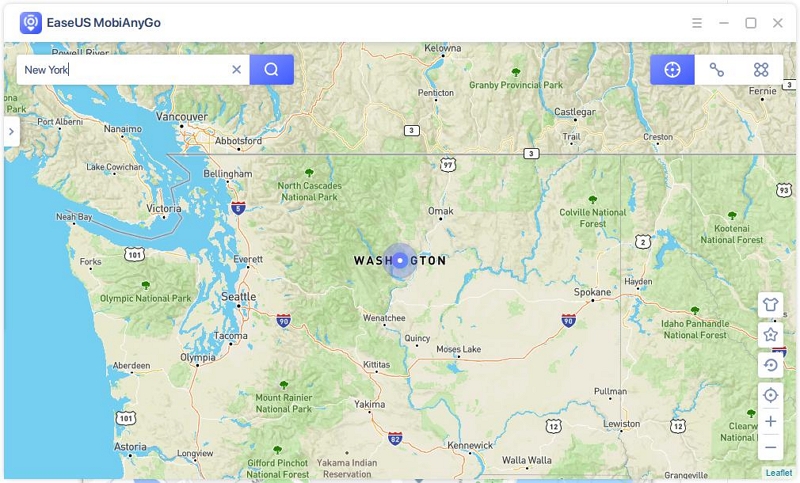
Features:
- Changes the iOS location to anywhere in the world.
- Create personalized routes in two-spot or multi-spot mode to move repeatedly along specific paths.
- Customize Your Moving Speed: Choose between Walk Mode, Bicycle Mode, or Drive Mode to simulate natural movements.
- Enable management of the GPS location on up to five different iOS devices.
Price
- 1-Month Plan for 1 PC: $9.95
- 3-Months Plan for 1 PC: $19.95
- 1 Year Plan for 1 PC: $39.95
- No lifetime plan
Pros
- The software works seamlessly with most location-based apps, including popular ones like Tinder and Pokémon GO, ensuring a smooth experience for users across various applications.
- Ability to change speed while moving, providing greater control and realism.
Cons
- No GPX import, jump teleport mode, and joystick feature.
- Only compatible with iOS devices for location spoofing; does not support spoofing location on Android phones.
- No lifetime pricing plan available.
Wrap up
If you used to rely on AnyTo and are now seeking an alternative tool, the five alternatives listed above, including MockGo, may prove useful. These tools are user-friendly and enable you to change your device's GPS location swiftly, allowing access to geo-restricted content or engagement in location-based AR games like Pokémon Go without physical movement.




 MockGo - iPhone GPS Changer
 Unlockit iPhone - Screen Unlocker
 Unlockit iCloud - Activation Lock Remover
 Unlockit Android - Screen Unlocker
 TinyFix - iOS System Repair